Why Software Needs Digital Signatures
Learn how digital signatures establish software publisher identity and detect tampering, how code signing works, and how to inspect a signature in Windows.
As digital technology develops, malware, phishing and other security threats continue to challenge businesses and users. Digital signatures help verify identity, authenticity and the integrity of digital information. They are widely used with software, email and Office documents.
This article explains what a digital signature does and why it matters when distributing software. Technical clarifications distinguish signature verification from guarantees that an application is safe.
What is a digital signature?
A digital signature is a cryptographic mechanism for checking the authenticity and integrity of a digital document, message or software file. In a public key infrastructure, the signer uses a private key to create a signature, and a verifier uses the corresponding public key to verify it. Verification is not the same operation as decrypting the entire file.
When combined with a trusted certificate, a valid signature can bind the signed content to a verified publisher identity and reveal whether that content has changed since signing. It does not establish that every action the software performs is trustworthy.
Certificates issued by a certificate authority, or CA, support different signing uses, including code signing, S/MIME email security and document signing.
The main elements involved are:
- A cryptographic signature generated by the file owner or authorized publisher.
- A cryptographic digest, or hash, of the signed content, used in checking integrity.
- The signer’s certificate, containing the public key and identity information certified by the CA according to its validation policy.
- The corresponding private key, which the signer must keep secret. The private key is not included in the distributed signature or software package; it is used to produce the signature, not to encrypt the software file for distribution.
Why sign software?
Signing software with a CA-issued code signing certificate supports several important functions:
-
Checking code integrity. Verification establishes whether the signed content still matches what was signed. It does not prevent all future changes, but changes to the covered content invalidate the signature.
-
Detecting tampering. A signature allows supported operating systems and tools to detect modifications after signing. They may warn the user or block execution according to their policies. Signing does not physically prevent an attacker from changing a file.
-
Identifying the publisher. The CA validates the applicant’s identity before issuance. The resulting signature helps users and software platforms identify the publisher, although publisher identity alone is not a malware check.
-
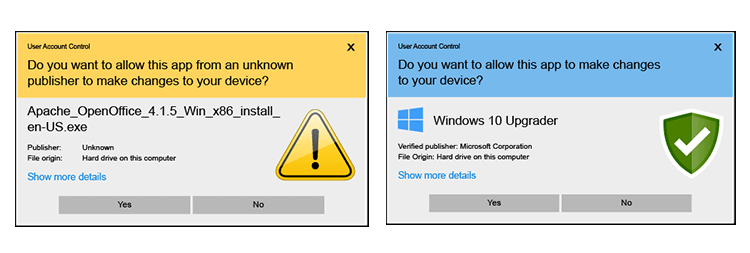
Reducing unknown-publisher warnings. A valid, trusted signature can display the verified publisher instead of an unknown publisher. Other installation or security warnings may still apply.
-
Supporting reputation-based decisions. Both standard and EV code signing certificates provide authenticated signing identities. The original 2024 article said EV signing immediately removed SmartScreen warnings. That should not be relied on: Microsoft’s current guidance states that EV certificates no longer receive an immediate positive reputation and newly distributed applications may still trigger warnings.
-
Supporting distribution requirements. Windows, Apple and Android ecosystems use software signing, but their certificate programs, package formats and distribution rules differ. A public code signing certificate is not a universal replacement for Apple Developer signing or Android and Google Play signing arrangements.
-
Presenting a consistent publisher identity. Showing a verified organization name can help users recognize the software’s source and support a publisher’s brand reputation.
Signing software with a code signing certificate
Code signing tools support a range of executable and package formats. The original article listed .exe, .cat, .ocx, .xpi, .msi, .dll and .cab; support depends on the target ecosystem and signing tool, and older formats may have separate distribution rules.
The original article described a hardware-token issuance workflow:
- Choose a certificate. Racent offered code signing certificates from providers including Sectigo, DigiCert and GlobalSign. Validation times, supported workflows and prices differ, so selection should reflect the organization’s requirements and budget.
- Submit the applicant’s information. Supply the business details and supporting documents required for the application.
- Complete validation. The CA verifies the submitted information and may use a telephone call or other approved checks.
- Receive or provision the signing key. In the token workflow described in 2024, the certificate and key were provisioned on a hardware token shipped to the applicant. Other supported options, such as managed remote signing, depend on the selected service; international shipping is not a universal requirement.
- Sign the software. Follow the relevant signing guide and protect access to the signing key. Check the resulting signature before distributing the package.
How to inspect a software signature in Windows
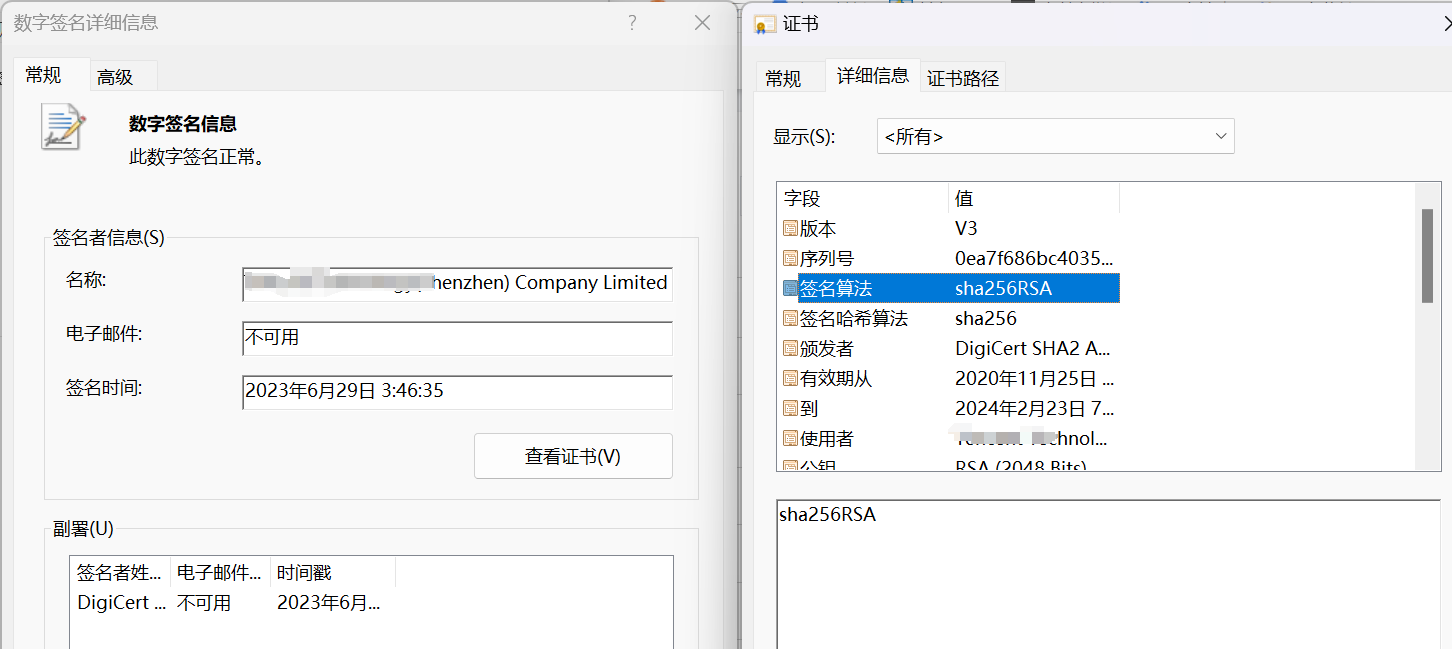
Open the folder containing the application, right-click the file, and select Properties → Digital Signatures. Choose a signature, such as one using SHA-256, and select Details to inspect it. The tab and available details depend on whether the file carries a signature in a format Windows recognizes.
Digital signatures are an important part of software distribution: they help verify publisher identity and detect changes to signed content. They work alongside secure development, malware detection, protected signing infrastructure and distribution controls rather than replacing those safeguards.
The original article introduced Racent’s certificate services and signing guidance. For current international options, explore code signing certificates or contact us for support through NicSRS.